

Programming, graphics, games, media, C++, Windows, Internet and more...
Entries for tag "rendering", ordered from most recent. Entry count: 187.
# ShaderCrashingAssert - a New Small Library
Sun
20
Aug 2023
Last Thursday (August 17th) AMD released a new tool for post-mortem analysis of GPU crashes: Radeon GPU Detective. I participated in this project, but because this is my personal blog and because it is weekend now, I am wearing my hobby developer hat and I want to present a small library that I developed yesterday:
ShaderCrashingAssert provides an assert-like macro for HLSL shaders that triggers a GPU memory page fault. Together with RGD, it can help with shader debugging.
Comments | #rendering #directx #productions #libraries #gpu #tools Share
# Impressions from Vulkanised 2023 Conference
Thu
16
Feb 2023
Last week I attended Vulkanised conference. It is an official conference of Vulkan API. It took place 7-9 February 2023 in Munich, Germany. It was my first time at this conference. My attendance was part of my job at AMD and I co-presented with Valve about using Radeon Developer Tools on RADV (Linux AMD driver) and Steam Deck. Here, on my blog, I would like to share my personal impressions from the event.


Overall, it was well organized. There were over 200 attendees, 3 days full of talks, most of them short (20-30 minutes, some of them even 10 minutes!), happening on just one scene (apart from full-day Vulkan tutorial for beginners, happening on the first day in parallel with normal talks), with lunch break and coffee breaks in between, so everyone could see everything without a need to choose from the timetable which talks to attend. It was intense. Every evening we went for some good food and beer, which I enjoy a lot every time I visit Munich/Bavaria/Germany.

In terms of people attending, a conference like this differs completely from game developer conferences that I usually attend. On one hand, everyone there was a programmer who knows and uses Vulkan, so everyone was on the same page. On gamedev conferences, there are people from different fields, as game development is multidisciplinary - graphics and music artists, designers, programmers, business people etc. On the other hand, there were not so many people from game industry there, and if anyone, they were mostly from the world of mobile GPUs, not PC or console. It was interesting to talk with developers from various industries, using GPUs and Vulkan for different applications, like scientific computations and visualizations or even… software for cloth design for fashion business.
There were many interesting talks. I think the most valuable ones were about components of the Vulkan ecosystem that are useful to every developer, like Vulkan validation layers, VkConfigurator, Vulkan loader, or GFXReconstruct (which also added support for Direct3D 12 recently, by the way!). There were long and extensive talks teaching two recent big additions to the API: mesh shaders and Vulkan Video. Vulkan Video seems to be especially complicated, partially because it requires some knowledge of video encoding/decoding, which is something different from 3D rendering. I used to work for television, so it was not that obscure for me. But this new part of the API is also very low level. The decision to make encoding/decoding of every frame stateless, with all the state of the video stream managed by the user, makes the API surface very extensive.
Talk about Diligent Engine was interesting. I didn’t look at the project itself, but the presentation looked convincing that this is a good multi-platform 3D graphics library implemented on top of various graphics APIs. Another interesting project presentation was about VkFFT - a C library that calculates FFT on the GPU using one of many supported APIs (not only Vulkan) with state-of-the-art performance. It is implemented by assembling a string with the source code of a kernel optimized for a specific case.
Presentations about game optimization for mobile GPUs were very interesting to me. Optimizing games is what I do in my everyday job, although I work with “large” PC GPUs. I consider such talks with a collection of tips and recommendations exceptionally valuable. From these presentations, I could learn what things work fast on smartphone and tablet chips, which are different from PC and console chips. They said that on these platforms, energy consumption and bandwidth to and from memory is the most important. Because mobile GPUs are tile-based, a large amount of vertices or fat vertex format is very slow, which is not the case on PC. Also because of that, they recommend to group as many passes as possible as sub-passes of a single Vulkan render pass, even to a degree that rendering of 3D objects could be grouped together with screen-space postprocessing effects. Again, it isn’t a thing that we normally do on PCs. It was also interesting to see how they measure performance. While I always disable V-sync and just measure FPS in games, they seem to give multiple columns with results, including FPS, but also GPU utilization %, which is likely used when reaching 60 FPS with V-sync always enabled.
But more than any specific presentation, it was interesting for me to hear some general ideas about Vulkan, often repeated by multiple people. There were people from Khronos and LunarG there (the company that develops Vulkan SDK), so we could hear from and ask questions to people who really make this API. There was a discussion panel with many prominent participants who shared their voice on these topics. Noone said “what happens on Vulkanised stays on Vulkanised”, so here are some things I remember. Disclaimer: These are my personal, subjective impressions. I might remember something wrong. Please feel free to leave a comment with your own thoughts below this article.
Some profound things have been said about Vulkan. Someone said it’s not a graphics API, more like a Hardware Abstraction Layer (HAL) or an API for programming accelerators. They said it is a “design by compromise” rather than “design by committee”. They said we should think of Vulkan as not only the specification, by the entire ecosystem, including libraries, tools, code samples, learning materials, etc. I was pleased to hear that Vulkan Memory Allocator that I maintain was often mentioned as one of the examples. An open question is how many of these 3rd party components should be considered “canonical”. Many are already included in Vulkan SDK, but should official samples use them as well? Currently, they don’t, as they teach raw Vulkan. Someone also said that these ecosystem components should be properly funded. Another question was about the direction Vulkan should go. One person said it should probably become even more low-level, with app-space libraries on top of it more widely used.
It was surprising to see that there are solutions to run Vulkan above and below every other graphics API, which makes Vulkan a common ground across systems and APIs:

Among problems that developers have with using Vulkan and potential areas of development for the future, I noticed several common themes:
Overall, participation in Vulkansed conference was a great experience for me. I wish I will come back there. But Vulkan, even with its unprecedented openness, portability, and universality, is just part of the entire world of 3D graphics programming. On a conference dedicated to Vulkan I wouldn’t say loud that Direct3D 12 is more popular among PC game developers and it is not without a reason, or that maybe both these “explicit” APIs are at the worst possible level of abstraction - low level enough to be difficult to learn, to use, and easy to create bugs, while high-level enough to still hide hardware details crucial to squeezing maximum performance. But this is a separate topic…
When attending any event, I always pay attention to the quality of the audio-video system. On Vulkanised, it was very good. I especially liked the acoustics of the room, which clearly someone paid attention to when designing the interior. But there were some issues with presentation video that I don’t see too often. I blogged before about 3 Rules to Make You Image Looking Good on a Projector, where I mentioned potential problems with contrast, reproduction of colors or thin lines. Another time I described a possibility that edges of the screen may be cropped. But this conference had a different problem. Instead of connecting their laptops to a HDMI cable, speakers were asked to join an online meeting via Google Meet and share their screen there, with presentation on the big screen by another participant of that virtual call, streaming the content. We were in a Google office, after all :) This surely helped them record the presentations easily, but it also made any video or animation degraded to what looked like 2 FPS.
For more photos, see the official gallery 2023 Vulkanised by Khronos.
Comments | #events #vulkan #rendering Share
# Hello World Under the Microscope - New Article Published
Tue
11
Oct 2022
A Python program that prints "Hello World" on the console - what can be simpler than this? The entire program is:
print("Hello World")
Yet, together with my friends, we wrote a long article about it! When the topic is described by two security researchers skilled in reverse engineering and knowledgeable about the internals of Python interpreter, Windows operating system, and its console, together with a graphics programmer that knows how graphics and text get displayed on the screen, from Direct3D API down to the internals of a graphics card and pixels on the screen, the result is an in-depth description of the long journey this simple command makes in a computer.
The article was originally published in Polish in issue 100 (1/2022) of the Programista magazine in February 2022. Now, we prepared an English translation, and we are allowed to publish it for free on the Internet, so here it is: Hello World under the microscope. You can also download the original Polish version as PDF file or order printed version of the magazine.
Comments | #rendering #productions Share
# An Idea for Visualization of Frame Times
Mon
30
May 2022
In real-time graphics applications like games, we usually measure performance as the average number of frames per second (FPS). Showing this average is a good estimate of how well the application performs, how heavy is the per-frame workload, how fast is the system where it executes, and, most importantly, whether the performance suffices for showing a smooth, good looking animation, as opposed to a "slideshow". But this is not a complete story. If some frames take an exceptionally long time, then even if others are very short, an unpleasant hitching may be visible to the player, while average FPS still looks fine. Therefore it is worth to visualize duration of individual frames on a graph, to see if they are stable.
One idea for such a graph is to draw a line connecting data points (frames), where X axis is the frame index and Y axis is the frame duration (dt), like on these pictures: "GPU Reviews: Why Frame Time Analysis is important", page 3. If such graph is shown in real time, there is one problem with it: it doesn't move at a constant pace, as the horizontal axis is expressed in frames, not seconds, so an exceptionally long frame will have the same width as super short frame. As the result, the graph will move faster the higher is the framerate.
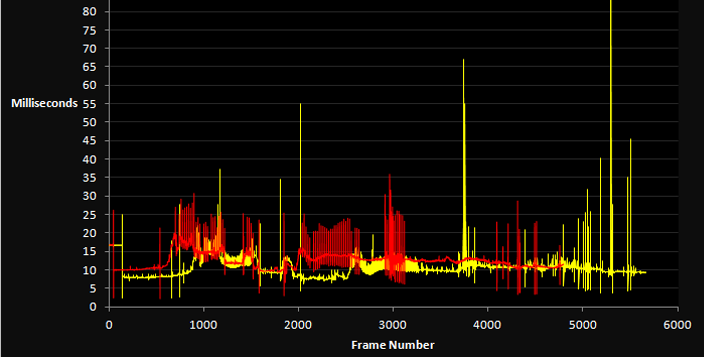
Source: "GPU Reviews: Why Frame Time Analysis is important", page 3
A better idea might be to move data points horizontally with time, so that a very long frame will generate a spike on the graph with previous point many pixels away on the horizontal axis. This is what AMD OCAT tool seems to be doing. However, it results in a long, oblique line on the graph.
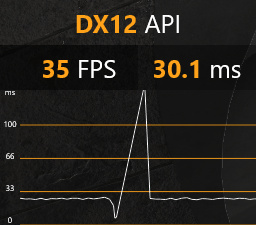
Overlay shown by OCAT tool
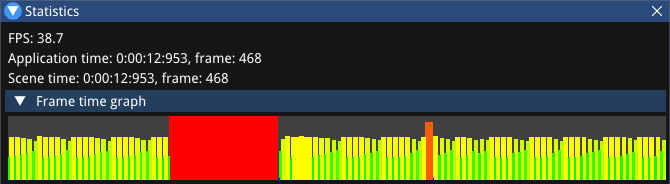
Some time ago I came up with another kind of graph. It shows every frame as a rectangle, with all its parameters: width, height, and color, dependent on the frame duration:
frameWidth = dt / (1/120). Rectangle left and right edges also need to be aligned to floor() and ceil(), respectively, so that every frame is visible as at least 1-pixel wide.frameHeightFactor = (log2(dt) - log2(1/120)) / (log2(1/15) - log2(1/120)). This factor then needs to be clamped to 0..1 and stretched to some range of minimum..maximum heights, depending on the intended looks of the graph, e.g. 2..64 pixels. This way, frames of a game running at 120 FPS will have minimum height, 60 FPS will be at 33%, 30 FPS - 66%, and for 15 FPS or less they will have maximum height.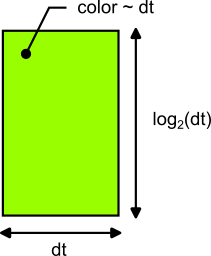
I think that with this kind of graph, both average framerate and outstanding extra-long frames are clearly visible at a first glance. You can see full example source code doing all this, implemented in C++ here: Game.cpp - RegEngine - sawickiap - GitHub. It uses GLM for math functions and Dear ImGui for 2D rendering.
For example, a game with V-sync on, running at steady 60 FPS, has the graph looking like this:
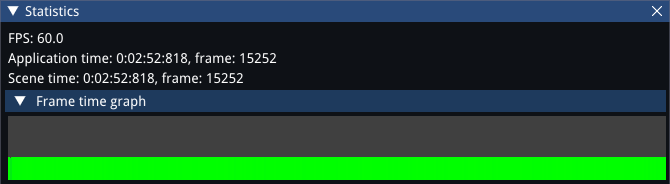
While a heavier GPU workload making the game running at around 38 FPS looks like this. The graph also shows an extra-long frame that froze the entire game because of loading something from the disk, and another hitch caused by pressing PrintScreen key.
# Vulkan Memory Allocator 3.0.0 and D3D12 Memory Allocator 2.0.0
Sat
26
Mar 2022
Yesterday we released new major version of Vulkan Memory Allocator 3.0.0 and D3D12 Memory Allocator 2.0.0, so if you are coding with Vulkan or Direct3D 12, I recommend to take a look at these libraries. Because coding them is part of my job, I won't describe them in detail here, but just refer to my article published on GPUOpen.com: "Announcing Vulkan Memory Allocator 3.0.0 and Direct3D 12 Memory Allocator 2.0.0". Direct links:
Vulkan Memory Allocator
D3D12 Memory Allocator
Comments | #rendering #directx #vulkan #gpu #libraries #productions Share
# Creative Use of GPU Fixed-Function Hardware
Wed
22
Sep 2021
I recently broke my rule of posting on my blog at least once a month as I had some other topics and problems to handle in my life, but I'm still alive, still doing graphics programming for a living, so I hope to get back to blogging now. This post is more like a question rather than an answer. It is about creative use of GPU fixed-function hardware. Warning: It may be pretty difficult for beginners, full of graphics programming terms you should already know to understand it. But first, here is some background:
I remember the times when graphics cards were only configurable, not programmable. There were no shaders, only a set of parameters that could control pre-defined operations - transform of vertices, texturing and lighting of pixels. Then, shaders appeared. They evolved by supporting more instructions to be executed and a wider variety of instructions available. At some point, even before the invention of compute shaders, the term “general-purpose computing on GPU” (GPGPU) appeared. Developers started encoding some data as RGBA colors of texture pixels and drawing full-screen quads just to launch calculation of some non-graphical tasks, implemented as pixel shaders. Soon after, compute shaders appeared, so they no longer need to pretend anything - they can now spawn a set of threads that can just read and write memory freely through Direct3D unordered access views aka Vulkan storage images and buffers.
GPUs seem to become more universal over time, with more and more workloads done as compute shaders these days. Will we end up with some generic, highly parallel compute machines with no fixed-function hardware? I don’t know. But Nanite technology from the new Unreal Engine 5 makes a step in this direction by implementing its own rasterizer for some of its triangles, in form of a compute shader. I recommend a good article about it: “A Macro View of Nanite – The Code Corsair” (it seems the link is broken already - here is a copy on Wayback Machine Internet Archive). Apparently, for tiny triangles of around single pixel size, custom rasterization is faster than what GPUs provide by default.
But in the same article we can read that Epic also does something opposite in Nanite: they use some fixed-function parts of the graphics pipeline very creatively. When applying materials in screen space, they render a full-screen pass per each material, but instead of drawing just a full-screen triangle, they do a regular triangle grid with quads covering tiles of NxN pixels. They then perform a coarse-grained culling of these tiles in a vertex shader. In order to reject one, they output vertex position = NaN, which makes a triangle incorrect and not spawning any pixels. Then, a more fine-grained culling is performed using Z-test. Per-pixel material identifier is encoded as depth in a depth buffer! This can be fast, as modern GPUs apply “HiZ” - an internal optimization to reject whole groups of pixels that fail Z-test even before their pixel shaders are launched.
This reminded me of another creative use of the graphics pipeline I observed in one game a few years ago. That pass was calculating luminance histogram of a scene. They also rendered a regular grid of geometry in screen space, but with “point list” topology. Each vertex was sampling and calculating average luminance of its region. On the other end, the histogram texture of Nx1 pixels was bound as a render target. Measured luminance of a region was returned as vertex position, while incrementation of the specific place on the histogram was ensured using additive blending. I suspect this is not the most optimal way of doing this, a compute shader using atomics could probably do it faster, but it surely was very creative and took me some time to figure out what that pass is really doing and how is it doing it.
After all, GPUs have many fixed-function elements next to their shader cores. Vertex fetch, texture sampling (with mip level calculation, trilinear and anisotropic filtering), tessellation, rasterization, blending, all kinds of primitive culling and pixel testing, even vertex homogeneous divide... Although not included in the calculation of TFLOPS power, these are real transistors with compute capabilities, just very specialized. Do you know any other smart, creative uses of them?
Comments | #rendering #optimization #gpu Share
# VkExtensionsFeaturesHelp - My New Library
Thu
01
Apr 2021
I had this idea for quite some time and finally I've spent last weekend coding it, so here it is: 611 lines of code (and many times more of documentation), shared for free on MIT license:
** VkExtensionsFeaturesHelp **
Vulkan Extensions & Features Help, or VkExtensionsFeaturesHelp, is a small, header-only, C++ library for developers who use Vulkan API. It helps to avoid boilerplate code while creating VkInstance and VkDevice object by providing a convenient way to query and then enable:
The library provides a domain-specific language to describe the list of required or supported extensions, features, and layers. The language is fully defined in terms of preprocessor macros, so no custom build step is needed.
Any feedback is welcome :)
Comments | #productions #vulkan #rendering Share
# Vulkan Memory Types on PC and How to Use Them
Sun
21
Feb 2021
Allocation of memory for buffers and textures is one of the fundamental things we do when using graphics APIs, like DirectX or Vulkan. It is of my particular interest as I develop Vulkan Memory Allocator and D3D12 Memory Allocator libraries (as part of my job – these are not personal projects). Although underlying hardware (RAM dice and GPU) stay the same, different APIs expose them differently. I’ve described these differences in detail in my article “Differences in memory management between Direct3D 12 and Vulkan”. I also gave a talk “Memory management in Vulkan and DX12” at GDC 2018 and my colleague Ste Tovey presented much more details in his talk “Memory Management in Vulkan” at Vulkanised 2018.
In this article, I would like to present common patterns seen on the list of memory types available in Vulkan on Windows PCs. First, let me recap what the API offers: Unlike in DX12, where you have just 3 default “memory heap types” (D3D12_HEAP_TYPE_DEFAULT, D3D12_HEAP_TYPE_UPLOAD, D3D12_HEAP_TYPE_READBACK), in Vulkan there is a 2-level hierarchy, a list of “memory heaps” and “memory types” inside them you need to query and that can look completely different on various GPUs, operating systems, and driver versions. Some constraints and guarantees apply, as described in Vulkan specification, e.g. there is always some DEVICE_LOCAL and some HOST_VISIBLE memory type.
A memory heap, as queried from vkGetPhysicalDeviceMemoryProperties and returned in VkMemoryHeap, represents some (more or less) physical memory, e.g. video RAM on the graphics card or system RAM on the motherboard. It has some fixed size in bytes, and current available budget that can be queried using extension VK_EXT_memory_budget. A memory type, as returned in VkMemoryType, belongs to certain heap and offers a “view” to that heap with certain properties, represented by VkMemoryPropertyFlags. Most notable are:
VK_MEMORY_PROPERTY_DEVICE_LOCAL_BIT, which always matches flag VK_MEMORY_HEAP_DEVICE_LOCAL_BIT in the heap it belongs to, informs that the memory is local to the “device” (the GPU in Vulkan terminology). It doesn’t change what you can or cannot do with this memory type. If creating certain buffers or textures was possible only in GPU and not CPU memory, it would be expressed by appropriate bits not set in VkMemoryRequirements::memoryTypeBits. DEVICE_LOCAL flag set in a memory type is just a hint for us that resources created in that memory will probably work faster when accessed on the GPU.VK_MEMORY_PROPERTY_HOST_VISIBLE_BIT. Unlike previous one, this flag changes a lot. It means that you can call vkMapMemory on VkDeviceMemory objects allocated from this type and get a raw, CPU-side pointer to its data. In short: you can access this memory directly from the CPU, without a need to launch a Vulkan command for explicit transfer, like vkCmdCopyBuffer.VK_MEMORY_PROPERTY_HOST_CACHED_BIT, which can occur only on memory types that are also HOST_VISIBLE. This one again is just a hint for us. It changes nothing we can or cannot do with that memory. It just informs us that access to this memory will go through cache (from CPU perspective). As a result, a memory type with this flag should be fast to write, read, and access randomly via mapped pointer. What the lack of this flag means is not clearly defined. Such memory may represent system RAM or even video RAM, but a common meaning (at least on PC) is that accesses are then uncached but write-combined from CPU perspective, which means we should only write to it sequentially (best to do memcpy), never read from it or jump over random places, as it may be slow.Theoretically, a good algorithm as recommended by the spec, to search for the first memory type meeting your requirements, should be robust enough to work on any GPU, but, if you want make sure your application works correctly and efficiently on a variety of graphics hardware available on the market today, you may need to adjust your resource management policy to a specific set of memory heaps/types found on a user’s machine. To simplify this task, below I present common patterns that can be observed on the list of Vulkan memory heaps and types on various GPUs, on Windows PCs. I also describe their meaning and consequences.
Before I start, I must show you website vulkan.gpuinfo.org, if you don’t already know it. It is a great database of all Vulkan capabilities, features, limits, and extensions, including memory heaps/types, cataloged from all kinds of GPUs and operating systems.
1. The Intel way
Intel manufactures integrated graphics (although they also released a discrete card recently). As GPU integrated into CPU, it shares the same memory. It then makes sense to expose following memory types in Vulkan (example: Intel(R) UHD Graphics 600):
Heap 0: DEVICE_LOCAL
  Size = 1,849,059,532 B
  Type 0: DEVICE_LOCAL, HOST_VISIBLE, HOST_COHERENT
  Type 1: DEVICE_LOCAL, HOST_VISIBLE, HOST_COHERENT, HOST_CACHED
What it means: The simplest and the most intuitive set of memory types. There is just one memory that represents system RAM, or a part of it that can be used for graphics resources. All memory types are DEVICE_LOCAL, which means GPU has fast access to them. They are also all HOST_VISIBLE – accessible to the CPU. Type 0 without HOST_CACHED flag is good for writing through mapped pointer and reading by the GPU, while type 1 with HOST_CACHED flag is good for writing by the GPU commands and reading via mapped pointer.
How to use it: You can just load your resources directly from disk. There is no need to create a separate staging copy, separate GPU copy, and issue a transfer command, like we do with discrete graphics cards. With images you need to use VK_IMAGE_TILING_OPTIMAL for best performance and so you need to vkCmdCopyBufferToImage, but at least for buffers you can just map them, fill the content via CPU pointer and then tell GPU to use that memory – an approach which can save both time and precious bytes of memory.

