

Programming, graphics, games, media, C++, Windows, Internet and more...
This article was originally published in Polish language in issue 9/2013 (16) of Programista magazine.
Games and some other programs need to measure the passage of time, which is subject to limitations (such as range and precision) depending on the method used to measure it and the format used to store it. It is therefore important to understand these limitations and choose a function for reading the current time, a variable type for storing it, a unit, and a zero point appropriate to the application. We must also use time consciously, performing only operations that make logical sense and do not cause excessive loss of precision.
When writing a game or another real-time program, we need to measure the passage of time. Unlike in business systems, we are not concerned with the calendar date and current clock time, but with elapsed time in seconds, milliseconds, or even smaller units—the more accurately, the better. This may seem like a simple topic, and it is compared with other subjects in this field, such as 3D graphics programming, physics simulation, or artificial intelligence. Yet there are many possible solutions and a few pitfalls awaiting the programmer. It is therefore worth learning the basics and good practices to avoid mistakes.
When writing a game, we usually update the positions of objects held in memory every frame, taking into account their velocities and the time elapsed since the previous frame, according to the expression x = x + v * dt. We all remember this formula from school: “distance equals speed times time.” It is also the simplest numerical integration method, known as Euler’s method. It is worth looking into this subject too, because better methods exist. Nevertheless, programmers of old DOS games sometimes did not even use this approach. As a result, their games ran faster on newer computers, sometimes so fast that they became unplayable.
Using this formula makes the movement speed of objects independent of the speed at which the game runs, that is, its frame rate. There is another solution: enforcing a fixed FPS, but it has many disadvantages as well as some advantages. Multiplying velocity by the time delta also lets us express velocity in more natural units, such as meters per second rather than meters or pixels per frame. You should already know this, I assume, along with the rule that each frame should read the current time, calculate its difference from the previous frame’s time, and use that difference throughout the code that updates the game state. Here, however, let us focus on measuring time itself.
Articles about measuring time in game programming usually discuss the structure of the game loop and other related topics, such as coding timers that perform an action at a specified interval. We will focus on a slightly lower level. After a brief theoretical introduction, the following sections will explain which kinds of variables are best for storing time and which functions are best for reading its current value. We will then see an example implementation of a type that stores time and finally discuss how to process it correctly, including calculating FPS (frames per second).
When choosing a representation of time in code, we have several important decisions to make. The first is the unit in which time will be expressed. It could be seconds, milliseconds, or some number of cycles per second stored in a separate variable.
Time can be absolute or relative. In fact, every time is “relative”—expressed relative to some conventional time zero, just as geometry has an origin of coordinates, the point (0, 0, 0). In our Gregorian calendar, this is the conventional year AD 1; for the time of day, it is midnight; and for Unix time, it is the beginning of January 1, 1970, known as the “Unix epoch.” For time measured in processor cycles, it might instead be the moment the computer was last started. The choice of this point does not really matter as long as we consistently use the same one and do not exceed the range of our variable type or lose precision because of excessively large values (discussed below).
We can also call a time relative to a fixed zero point an absolute time to distinguish it from an interval—a span of time with no such reference point, expressing the duration of an operation, for example 3 seconds and 875 ms. In geometry, this corresponds to the distinction between a point and a vector. Depending on the implementation, we can write separate classes for absolute times and intervals, as the .NET Framework does with its DateTime and TimeSpan types. With overloaded operators, we can then allow only operations that make logical sense, namely:
All other operations are forbidden. For example, adding two times or multiplying a time by a scalar has no logical interpretation. We can, however, treat the distinction between time and interval as purely conceptual and use the same type in code to represent both, just as in geometry we usually have one type called vector3 or float3 to represent both a point and a vector in 3D. We will take this approach in the example code below by defining a single type, GameTime.
The next question is which variable type we should use to store time. In theory, there are two properties to watch out for: range and precision. Range is the maximum value that a variable of a given type can hold. For integers, it follows directly from the type’s width in bits.
Table 1 presents the integer types available in C++ and WinAPI and their ranges. Of course, the widths of built-in C++ types are not strictly specified by the standard. The table gives their interpretation in Visual C++. Types beginning with __ (two underscores) are nonstandard compiler extensions. Types whose widths are specified in bits come from the <cstdint> / <stdint.h> header. Those written in uppercase are available after including <Windows.h>.
Table 1. Properties of integer types in C++
| Type | Width | Value range |
|---|---|---|
signed char, __int8int8_tCHAR, INT8 | 8 b = 1 B | -128 … 127 |
unsigned char, unsigned __int8uint8_tUCHAR, UINT8, BYTE | 8 b = 1 B | 0 … 255 |
short, __int16int16_tSHORT, INT16 | 16 b = 2 B | -32 768 … 32 767 |
unsigned short, unsigned __int16uint16_tUSHORT, UINT16, WORD | 16 b = 2 B | 0 … 65 535 |
int, __int32, longint32_tINT, INT32, LONG, LONG32 | 32 b = 4 B | -2 147 483 648 … 2 147 483 647 |
unsigned int, unsigned __int32, unsigned longuint32_tUINT, UINT32, ULONG, ULONG32, DWORD | 32 b = 4 B | 0 … 4 294 967 295 |
long long, __int64int64_tINT64, LONG64 | 64 b = 8 B | -9 223 372 036 854 775 808 … 9 223 372 036 854 775 807 |
unsigned long long, unsigned __int64uint64_tUINT64, ULONG64, QWORD | 64 b = 8 B | 0 … 18 446 744 073 709 551 615 |
Because integers have no fractional part, they represent time with the precision of their chosen unit. If we choose milliseconds as the unit, time in such a variable will be stored to the nearest millisecond. As for range, a 32-bit number with a maximum value of more than 4 billion might seem sufficient. Yet, as is easy to calculate, choosing milliseconds as the unit will overflow the range after just 49 days and 17 hours. A 64-bit number, on the other hand, has enough range for practically any application. Even if it expresses time in individual cycles of a 3 GHz processor (a unit of 0.333 ns), its range will last for 195 years.
Floating-point numbers, because they store the mantissa and exponent separately, can represent both very small and very large numbers. Range is therefore not the problem. Instead, they have limited precision, expressed in significant digits. Many more properties can be defined for them. Table 2 shows some of these.
Table 2. Properties of floating-point types
| Type | float | double |
|---|---|---|
| Bits = sign + exponent + mantissa | 32 = 1 + 8 + 23 | 64 = 1 + 11 + 52 |
| Exponent range | −126 … 127 | −1022 … 1023 |
| Significant decimal digits | ≈ 7.225 (6 … 9) | ≈ 15.955 (15 … 17) |
| Smallest subnormal value | 2−149 ≈ 1.4 × 10−45 | 2−1022-52 ≈ 5 × 10−324 |
| Smallest normal value | 2−126 ≈ 1.18 × 10−38 | 2−1022 ≈ 2.225 × 10−308 |
| Next value after 1 | 1 + 2−23 ≈ 1.0000001 | 1 + 2−52 ≈ 1.0000000000000002 |
| Integers represented exactly | 0 … 224 = 16,777,216 | 0 … 253 = 9,007,199,254,740,992 |
| Maximum value | (2−2−23) × 2127 ≈ 3.4 × 1038 | (1 + (1 − 2−52)) × 21023 ≈ 1.79769 × 10308 |
A detailed explanation of how floating-point numbers work and the resulting limitations could fill a separate article (see my other article: The Secrets of Floating-Point Numbers). Here, we will only establish how they affect the storage of time. Above all, because the decimal point shifts, precision expressed in units decreases as the value grows. Since float is 32-bit—just like int—it has the same number of possible values, so a float cannot exactly represent every integer in the range of an int.
Here is an example of the precision problem. Suppose we store time expressed in seconds in a float. When its value is about 1 s, the precision—the difference between adjacent values—is about 119 ns. That is certainly enough for precise calculations in a game simulation. But when the value rises to 10,000 s, or about 3 hours, the precision is just under 1 ms. When the time reaches 100,000 s, or about 1 day, the precision is only 7.81 ms. [1] It is worth adding that precision degrades in the same way regardless of the unit we choose, whether milliseconds or seconds.
Loss of precision occurs with large values, above all with absolute time. The farther “time zero” is from the present moment, the worse the problem becomes. Therefore, float variables are not the best way to store such values. If we use them anyway, we should keep the values as small as possible—for example, by measuring time relative to when the game started rather than to some point in the past specified by the operating system. This can be done by subtracting the current time from the time read when the game started.
It is important to perform this subtraction using a more precise representation and convert only the resulting difference—which is now small—to float. Otherwise, we may encounter a phenomenon called catastrophic cancellation. It can be illustrated just as well with decimal numbers, because the principle is the same as in binary representation. Suppose we express time in seconds and store it to 4 decimal places, with the decimal point always positioned so that there is one nonzero digit before it. The previous frame occurred at exactly 10 s, written as 1.0000 × 101 s. If 4.3210 ms elapses before the next frame, its absolute time must be written as 1.0004 × 101 s. Subtracting the new time from the previous one gives 0.0004 × 101 s, or, after normalization, 4.0000 × 10⁻³ s, because the remaining digits were lost due to the large absolute time value. Thus, although this representation has 5 significant decimal digits of precision, subtracting two close values yields a number with only 1 digit of precision. Conversely, adding a delta of 4.3210 ms to an absolute time of 1.0000 × 101 s yields 1.0004 × 101 s, so only the first digit of the delta is used: at values around 10 s, adjacent values in this representation are 1 ms apart. The delta from the previous frame itself, however, is small enough to be stored in such a variable without much concern about precision.
In theory, this loss of precision as values grow need not be a problem. If we measure time from the start of a game that can be completed within an hour, values up to 3,600 seconds still provide precision better than 1 ms, which should suffice. It is different if we are writing a program such as an MMO game server that may run for months without restarting. Besides, we would not wish on anyone the task of tracking down bugs that appear only after many hours or days of the game or program running.
Using double might seem like a solution to the precision problem. It does have sufficient precision for practically any application. However, it brings several other problems. First, calculations on this type do not necessarily use its full precision, depending on the FPU settings for the current thread. These settings can be changed with _controlfp. DirectX 9 changes them automatically unless we specify the D3DCREATE_FPU_PRESERVE flag when creating a device object. Also, using double does not eliminate precision problems caused by the floating point; it only reduces them. Furthermore, operations on this type run more slowly than on float. [2]
Therefore, it is better to use a 64-bit integer type to store absolute time and use float only to store the time delta for simulation calculations within a frame.
Let us now discuss functions for reading the current time. The available functions naturally depend on the programming language and operating system we use, each of which provides some API for this purpose. Functions of this kind are provided by both the language’s standard library and the operating system API. It is worth knowing the differences between them. Here we will focus on functions available on the x86 PC platform.
The fundamental properties of a time-reading function are the type of data it returns and, consequently, its range and precision. It is important to stress that the accuracy of a time measurement may be lower than the precision with which it is stored. An extreme example would be someone looking at the sun’s position in the sky and then declaring that it is 12:16. Although the time is expressed to the nearest minute, the measurement itself may be off by hours. It would be just as reasonable to say “around noon.” Similarly, in programming, a function that returns time in milliseconds may actually report values with lower accuracy, for example by “jumping” every few dozen milliseconds.
Another property of a time-reading function is monotonicity—the assumption that each successive call returns a value no smaller than the previous one. This assumption does not hold, among others, for functions that return “wall-clock time,” meaning the current date and clock time. The value read is subject to unexpected changes, for example when switching between standard and daylight saving time or after time is updated over the Internet using NTP.
We can encounter a similar problem of unexpected time “jumps” (at least forward) whenever a game is suspended while running, for example because the whole system goes to sleep or because of a debugger. The time elapsed since the previous frame may then turn out to be many minutes or even hours. Therefore, it is worth clamping the calculated time delta to at least 0 on one side and to a reasonable maximum, such as 1/10 of a second, on the other.
Some functions return wall-clock time, while others read the processor cycle counter or another similar hardware counter. These methods are usually very precise and are not subject to system-clock corrections, but when studying their descriptions we should watch for additional hazards. First, modern processors can change their clock speed while running, so the number of cycles per second may vary and cause the pace of time in the game to change. Second, if every processor or core in a computer has its own counter, the returned value may depend on the core executing the current thread’s instructions.
Here are the most important methods of reading time available on the PC platform:
time function from the C standard library, declared in <time.h>: It returns the date and time as a time_t value, in seconds since the Unix epoch. Its precision is, of course, insufficient for measuring time in games.gettimeofday function from <sys/time.h>, available on Unix platforms: It returns the date and time as a timeval, a structure containing a time_t and a number of microseconds. It has single-microsecond accuracy, making it a good candidate for games. Unfortunately, it is also subject to system-time changes.clock_gettime function from <time.h>, available on Unix platforms: It can read different clocks depending on the parameter supplied: CLOCK_REALTIME (system time, similar to gettimeofday), CLOCK_MONOTONIC (a processor counter), or CLOCK_MONOTONIC_RAW. It returns a timespec made up of a time_t and a number of nanoseconds. It has very high accuracy: about 0.000035 ms on a 3.5 GHz Xeon, for example [3].GetSystemTimeAsFileTime function available in WinAPI, declared in <Windows.h>: It returns the current date and time as a 64-bit number of 100-nanosecond intervals since January 1, 1601. It has fairly good accuracy—about 0.5 ms [3]. Unfortunately, it is subject to system-clock changes.GetTickCount function, also available in WinAPI: It returns the number of milliseconds since system startup as a DWORD. This number overflows after the system has run for more than 49 days and 17 hours (although Windows rarely runs for that long without restarting :). A 64-bit version, GetTickCount64, is available starting with Windows Vista. Although both return results in milliseconds, their accuracy is only about 10–20 ms—probably too low to measure time precisely for games.timeGetTime function from the WinAPI Multimedia group (requires linking with Winmm.lib): Like the preceding function, it returns the number of milliseconds since system startup as a DWORD. It has better accuracy, however, on the order of 1–5 ms. Accuracy can be increased further by calling timeBeginPeriod first. This may be a good solution for games.QueryPerformanceCounter from WinAPI: It returns a 64-bit count of cycles. The number of cycles per second can be read with QueryPerformanceFrequency (calling it once at program startup is enough). It has very high accuracy. For example, on my Windows 7 64-bit system with a 3.4 GHz AMD Phenom II X4 processor, it reports 3,335,439 cycles per second, giving precision better than 0.3 microseconds. Its counter should not fluctuate when a thread switches between processor cores or when the processor clock speed changes (although related bugs are known on some CPUs and chipsets). We will use this function in the code in the next section.rdtsc assembly instruction directly reads the processor counter, known as the Time Stamp Counter. It is the most low-level approach and has enormous precision, but depending on the platform, its value may vary according to the core on which it executes, or its rate of counting may change. It is therefore difficult to rely on it to measure elapsed time.Let us finally turn to the code. Listing 1 shows an implementation of the GameTime type, which represents time in the game. This is a structure I have used in my personal projects for years. Before writing it, I made the following design decisions:
QueryPerformanceCounter.GameTime to be mixed freely with an ordinary int64_t, but the stored value is available as a public field.GameTime::Init.Listing 1. The GameTime type
#include <Windows.h>
#include <cassert>
#include <cstdint>

struct GameTime
{
public:
    static const GameTime ZERO;
    static const GameTime MIN_VALUE;
    static const GameTime MAX_VALUE;

    static void Init();
    static GameTime GetCurrent();
    static GameTime FromMilliseconds(int64_t ms);
    static GameTime FromSeconds(float s);

    int64_t Value;

    GameTime() { }
    explicit GameTime(int64_t v) : Value(v) { }

    GameTime operator+() const { return *this; }
    GameTime operator-() const { return GameTime(-Value); }

    GameTime operator+(GameTime rhs) const { return GameTime(Value + rhs.Value); }
    GameTime operator-(GameTime rhs) const { return GameTime(Value - rhs.Value); }
    GameTime& operator+=(GameTime rhs) { Value += rhs.Value; return *this; }
    GameTime& operator-=(GameTime rhs) { Value -= rhs.Value; return *this; }

    friend GameTime operator*(GameTime lhs, int64_t rhs) { return GameTime(lhs.Value * rhs); }
    friend GameTime operator*(int64_t lhs, GameTime rhs) { return GameTime(lhs * rhs.Value); }
    GameTime operator/(int64_t rhs) const { return GameTime(Value / rhs); }
    GameTime operator%(int64_t rhs) const { return GameTime(Value % rhs); }
    GameTime& operator*=(int64_t rhs) { Value *= rhs; return *this; }
    GameTime& operator/=(int64_t rhs) { Value /= rhs; return *this; }
    GameTime& operator%=(int64_t rhs) { Value %= rhs; return *this; }

    int64_t operator/(GameTime rhs) const { return Value / rhs.Value; }
    GameTime operator%(GameTime rhs) const { return GameTime(Value % rhs.Value); }
    GameTime& operator%=(GameTime rhs) { Value %= rhs.Value; return *this; }

    bool operator==(GameTime rhs) const { return Value == rhs.Value; }
    bool operator!=(GameTime rhs) const { return Value != rhs.Value; }
    bool operator<(GameTime rhs) const { return Value < rhs.Value; }
    bool operator>(GameTime rhs) const { return Value > rhs.Value; }
    bool operator<=(GameTime rhs) const { return Value <= rhs.Value; }
    bool operator>=(GameTime rhs) const { return Value >= rhs.Value; }

    int64_t ToMilliseconds() const;
    float ToSeconds() const;

private:
    static bool m_Initialized;
    static int64_t m_Freq;
    static int64_t m_StartValue;
};

const GameTime GameTime::ZERO = GameTime(0);
const GameTime GameTime::MIN_VALUE = GameTime(INT64_MIN);
const GameTime GameTime::MAX_VALUE = GameTime(INT64_MAX);

bool GameTime::m_Initialized = false;
int64_t GameTime::m_Freq = 0;
int64_t GameTime::m_StartValue = 0;

void GameTime::Init()
{
    assert(!m_Initialized);
    QueryPerformanceFrequency((LARGE_INTEGER*)&m_Freq);
    QueryPerformanceCounter((LARGE_INTEGER*)&m_StartValue);
    m_Initialized = true;
}

GameTime GameTime::GetCurrent()
{
    assert(m_Initialized);
    int64_t v;
    QueryPerformanceCounter((LARGE_INTEGER*)&v);
    return GameTime(v - GameTime::m_StartValue);
}

GameTime GameTime::FromMilliseconds(int64_t ms)
{
    assert(m_Initialized);
    return GameTime((ms * m_Freq + 500) / 1000);
}

GameTime GameTime::FromSeconds(float s)
{
    assert(m_Initialized);
    return GameTime((int64_t)(s * (float)m_Freq + .5f));
}

int64_t GameTime::ToMilliseconds() const
{
    return (Value * 1000 + m_Freq / 2) / m_Freq;
}

float GameTime::ToSeconds() const
{
    return (float)Value / (float)m_Freq;
}
The zero value and the smallest and largest representable values (which can, for example, serve as a special value indicating an uninitialized variable) are available as static constants ZERO, MIN_VALUE, and MAX_VALUE.
Before using objects of this type in any way, preferably at the very beginning of the program, the static method Init must be called once. It initializes the class’s private fields with values read from the system: m_StartValue is the initial time value, subsequently treated as point zero, and m_Freq is the number of cycles per second.
The static method GetCurrent reads and returns the current time from the system. It calls QueryPerformanceCounter and subtracts the initial time m_StartValue from the result, so the returned value is measured relative to the call to Init. It is not multiplied or divided by anything, so it remains in the same units returned by that function.
The many overloaded operators define the mathematical operations that can be performed on this type: addition, subtraction, multiplication, division, remainder (modulo), and comparisons. They use simple integer arithmetic on the stored int64_t value.
The ToSeconds and FromSeconds methods respectively convert GameTime to a float value expressed in seconds and create a GameTime object from such a value. Converting cycles to (or from) seconds consists of dividing (or multiplying) the input value by m_Freq, the number of cycles per second.
The additional ToMilliseconds and FromMilliseconds methods can be useful for converting GameTime to (or from) a number of milliseconds stored as int64_t. They are worth using when we want (or have) a number of milliseconds or seconds and do not care about its fractional part, because these operations are performed entirely on integers and do not require conversion to (or from) a floating-point number, which is a relatively slow operation.
Let us now look at three simple examples of using GameTime. Listing 2 shows the simplest possible implementation of a game loop that measures time. On each iteration of the loop (each frame), it reads the current time. The difference between that time and the time read in the previous frame is the delta, the time step used for simulation. Absolute time remains stored in a GameTime variable, while the delta is converted to float. All three values are passed to Update. Within that function, wherever time is needed (for example, to calculate elapsed animation time or the lifetime of particles and other objects since their creation), it is worth using GameTime and the currTime and dt parameters. For calculations involving other float values—such as an object’s position in meters or velocity in meters per second—we can use the value passed as dt_f.
Listing 2. A simple game loop
GameTime::Init();
GameTime prevTime = GameTime::GetCurrent();
while(!exitProgram)
{
    GameTime currTime = GameTime::GetCurrent();
    GameTime dt = currTime - prevTime;
    float dt_f = dt.ToSeconds();

    Update(currTime, dt, dt_f);

    prevTime = currTime;
}
The second example, Listing 3, shows how to use GameTime to measure how long an operation takes. The current time is read before and after calling a long-running function. The difference is then calculated and, as in the previous example, only this difference—the time interval—is converted to float for display in units convenient for the user, namely seconds.
Listing 3. Measuring the duration of an operation
GameTime begTime = GameTime::GetCurrent();
LongOperation();
GameTime endTime = GameTime::GetCurrent();
GameTime duration = endTime - begTime;
printf("Operation took %g s\n", duration.ToSeconds());
Listing 4 shows how to perform an operation (here, a call to UpdateAI, which calculates artificial intelligence) at a specified interval (for example, every 1 second) rather than on every frame. The most convenient approach is to remember the absolute time at which the operation should run again. We use m_NextAIUpdateTime for this. When the current time currTime in a frame is greater than or equal to the stored value, we call UpdateAI and then increase m_NextAIUpdateTime by an interval of 1000 ms, or 1 s. Notice that this time is increased from its previous value, rather than assigned currTime + GameTime::FromMilliseconds(1000). This is a small but important difference. Within this condition, the current time will almost never be exactly equal to m_NextAIUpdateTime; it will usually be slightly greater. If currTime were used to calculate m_NextAIUpdateTime, that difference would be discarded, causing UpdateAI to run slightly less often than once per second on average.
Listing 4. Performing an operation at a specified interval
GameTime m_NextAIUpdateTime;
//(...)

int main()
{
    GameTime::Init();
    m_NextAIUpdateTime = GameTime::GetCurrent();
    // Game loop...
}

void Update(GameTime currTime, GameTime dt, float dt_f)
{
    //(...)
    if(currTime >= m_NextAIUpdateTime)
    {
        UpdateAI();
        m_NextAIUpdateTime += GameTime::FromMilliseconds(1000);
    }
}
At a higher level, the code shown here could be used to write a timer class that stores the current time in its fields, calculates the time delta in methods called every frame, and allows time to be paused or even scaled. It is useful to have several such timers (each with its own state and perhaps a different starting point), so that, for example, game logic can be paused or slowed while HUD animations and camera movement continue normally. That, however, is beyond the scope of this article.
A popular unit related to measuring time in games, familiar to both programmers and players, is FPS (frames per second). It is sometimes used incorrectly, so it is worth understanding what it really means.
How should we measure FPS? The most obvious solution is to count the frames processed over a period of time and divide that count by the duration. If we count every frame since the program started, we get the average FPS over its entire run. If instead we reset the counter from time to time—for example, every 1 s—we get the average FPS over the last second. Listing 5, based on code from [4], shows how to do this. The variable m_FPS is updated slightly more than once per second with a new value representing the average number of frames per second since the previous measurement. Two variables are used for this measurement: m_FPSTime measures the time since the previous measurement, while m_FPSFrames counts the frames processed during that time. FPS is calculated by dividing the latter by the former.
Listing 5. Measuring average FPS over the last second
GameTime m_FPSTime;
unsigned m_FPSFrames;
float m_FPS;

void InitFPS()
{
    m_FPSTime = GameTime::ZERO;
    m_FPSFrames = 0;
    m_FPS = 0.f;
}

void UpdateFPS(GameTime dt)
{
    m_FPSTime += dt;
    m_FPSFrames += 1;
    if(m_FPSTime >=
        GameTime::FromMilliseconds(1000))
    {
        m_FPS = (float)m_FPSFrames / m_FPSTime.ToSeconds();
        m_FPSTime = GameTime::ZERO;
        m_FPSFrames = 0;
    }
}
Another solution is to calculate FPS as the reciprocal of frame time: m_FPS = 1.f / dt.ToSeconds(). This is an instantaneous FPS value. Because it would change every frame and, like frame time, could fluctuate considerably, this method is not very useful (although we could average the resulting instantaneous FPS over several preceding frames). It does show, however, what we are really dealing with. FPS is the reciprocal of the current or average frame time, and its unit—frames per second, or 1/s—is simply Hz (frequency). Because division is involved, it is a nonlinear measure. It is therefore unsuitable for calculations that quantify application performance.
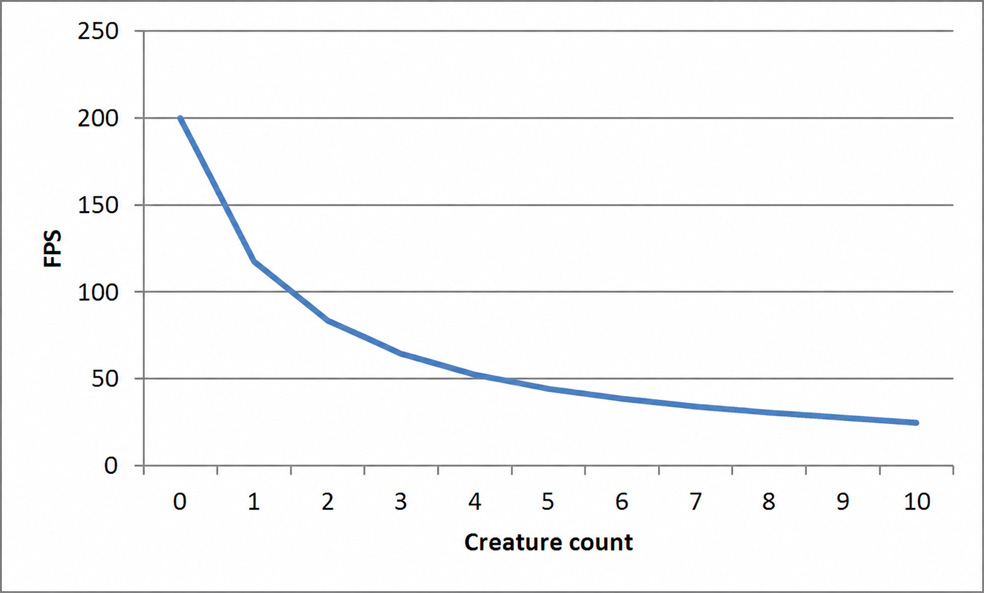
To simplify, frame time depends proportionally on the complexity of the scene (or its visible part) that must be calculated and rendered, especially on the number of objects. Suppose an empty scene in a game renders at 200 FPS, so one frame takes 5 ms. Adding each additional monster to the scene increases frame time by 3.5 ms. A scene with one creature then runs at 118 FPS, with 2 at 83 FPS, and with 10 at 25 FPS. Figure 1 shows the relationship between the number of creatures in this scene and FPS. As you can see, FPS decreases nonlinearly as the number of objects grows. The curve has the shape of the function 1/x.
Here is another example. One programmer was writing a game that ran at 110 FPS. Another programmer’s game ran at only 20 FPS. The first spent a week optimizing code and found that the game now reached 151 FPS. Delighted, he told everyone that his optimization had gained a full 41 FPS. Meanwhile, after a week of hard work, the second saw an increase to 21 FPS—“a measly 1 FPS.” Did the first programmer really have reason to celebrate, and the second to be disappointed?
In fact, both of them sped up their games by 2.5 ms per frame! Before optimization, a frame took 9 ms in the first programmer’s game and 50 ms in the second’s. They therefore did comparable work. The second programmer’s work was even more valuable, because a game running at 20 FPS certainly needed optimization more urgently.
The lesson is this: FPS cannot be used to quantify performance or its improvement, because it is a nonlinear measure—the reciprocal of time—and time is the appropriate unit for measuring performance. Even some scientists make this mistake in their publications. Remember never to say “a change of X FPS.” Likewise, when analyzing a game’s performance in more detail, always state how many milliseconds of each frame are spent on physics, AI, and other parts of its total frame time.
This does not mean that FPS cannot be compared multiplicatively. Statements such as “FPS doubled” or “FPS increased by 20%” are unambiguous regardless of the starting value: the first means that frame time was halved, while the second means that FPS became 1.2 times the starting value, so frame time decreased by about 16.7%.
Does reporting FPS make any sense, then? Yes, because frequency determines whether a game runs smoothly. People perceive a sequence of images as smooth animation from about 25–30 FPS, and preferably at 60 FPS (the difference between 30 and 60 FPS is very noticeable). Thus, the FPS a game achieves (on average or in a particularly complex scene) is a good criterion for judging whether it runs fast enough for the displayed image to look smooth.
Finally, it is worth mentioning a few other issues related to this topic. The time delta by which we advance the simulation in a given frame is really an estimate of how long that frame will take. Using the duration of the previous frame for this purpose is merely the simplest way to make this estimate, and it has drawbacks. It assumes that successive frames take roughly the same time. But if something made the previous frame unusually long (for example, AI calculations that run only once every few frames, or an antivirus program updating its databases in the background), the new frame will advance the simulation by a longer period. This will appear as game “stuttering” (the animation will not be smooth even if the average FPS is high). We can even imagine a situation in which the larger time delta makes the new frame take longer too (for example, two physics simulation steps run instead of one), affecting the next frame and so on, causing a longer slowdown. It is therefore worth using the average duration of several preceding frames as the time delta for a new frame. This reduces the impact of brief fluctuations in frame time (so-called spikes).
Remember also that the frame rate can be limited by the graphics API (OpenGL or DirectX), which may block the function that finishes a frame for longer when so-called vertical synchronization (V-sync) is enabled. The function then synchronizes with the monitor’s refresh rate, usually 60 Hz.
A more advanced way to handle the passage of time in a game is a fixed time step. In this method, the Update function that updates game state always receives the same time delta. During each frame, we call Update 0, 1, or more times. This provides greater stability in calculations (especially important in physics simulation) and makes it possible to write fully deterministic code, but it is harder to implement. See [5] for details.
The game’s update frequency is one measure; another is latency, which in games can be defined, for example, as the time from a player pressing a controller button to the resulting effect appearing on screen. Of course, the shorter this time, the better. Many factors contribute to latency, and frame time is only one of them. Others include, on one side, the time before information from the controller is read by the game code and, on the other, the time from updating the game state through sending the changed state for rendering, processing graphics commands by the driver and graphics card, to displaying the new frame on screen. These latter stages run asynchronously relative to the game code.
Games, as well as simulation and real-time programs, need to measure the passage of time precisely. Time, like any physical quantity, is subject to limitations (such as range and precision) depending on how it is measured and the format in which it is stored. It is therefore important to understand these limitations and choose a function for reading the current time, a variable type for storing it, a unit, and a zero point appropriate to the application. We must also use the different quantities (absolute time, interval, FPS) consciously, performing on them only operations that make logical sense and do not cause excessive loss of precision.
On the web
 English
 Polski